Part of the Fathom-OS Project Log.
Chapter 7 is a real shift. Up through Chapter 6 the work was cross-compilation done as the lfs user. This chapter changes ownership of the LFS files to root, mounts the kernel’s virtual filesystems, and enters the chroot environment. From inside the chroot you are no longer cross-compiling. You are working inside the LFS system itself, using the tools built in Chapter 6 to build a few more, then cleaning up and saving the temporary system. The whole chapter is covered in one post.
References:
Important: This Chapter Runs as root, Not lfs
Every prior chapter ran as the lfs user. From Chapter 7 onward you work as root, first on the host for the setup steps, then as root inside the chroot. The book stresses this and so do I: several setup commands use $LFS directly while running as root, and if $LFS is empty in root’s environment those commands could affect the host system instead of the LFS partition. Confirm $LFS is set before every root command that uses it.
echo $LFS
Must return /lfs. If blank, export LFS=/lfs before continuing.
A Cross-Session Warning Worth Reading First
This is the single most important thing to understand about Chapter 7 if you work across multiple sessions like I do. The virtual kernel filesystems you mount in this chapter live in memory. They do not survive a logout or reboot. If you leave and come back later, you must redo the mounting from section 7.3 and re-enter the chroot from 7.4 before continuing, or the chroot will be missing /dev, /proc, /sys, and /run and things break.
Keep this in mind every time you return to the build during Chapters 7 and 8.
7.2 Changing Ownership
Right now everything under $LFS is owned by the lfs user, which only exists on the host. The book explains the risk: if left this way, a future account created with that same user ID would own all the LFS files, a security problem. Change ownership to root. Run as root with $LFS confirmed.
chown --from lfs -R root:root $LFS/{usr,var,etc,tools}
case $(uname -m) in
  x86_64) chown --from lfs -R root:root $LFS/lib64 ;;
esac
The --from lfs makes it only touch files currently owned by lfs, a safety measure.
7.3 Preparing Virtual Kernel File Systems
These mount the kernel’s virtual filesystems into the LFS tree so applications inside the chroot can find them. Run as root.
mkdir -pv $LFS/{dev,proc,sys,run}
mount -v --bind /dev $LFS/dev
mount -vt devpts devpts -o gid=5,mode=0620 $LFS/dev/pts
mount -vt proc proc $LFS/proc
mount -vt sysfs sysfs $LFS/sys
mount -vt tmpfs tmpfs $LFS/run
if [ -h $LFS/dev/shm ]; then
  install -v -d -m 1777 $LFS$(realpath /dev/shm)
else
  mount -vt tmpfs -o nosuid,nodev tmpfs $LFS/dev/shm
fi
Each mount prints a confirmation. This is the step you must repeat if you ever return to the build in a new session.
7.4 Entering the Chroot Environment
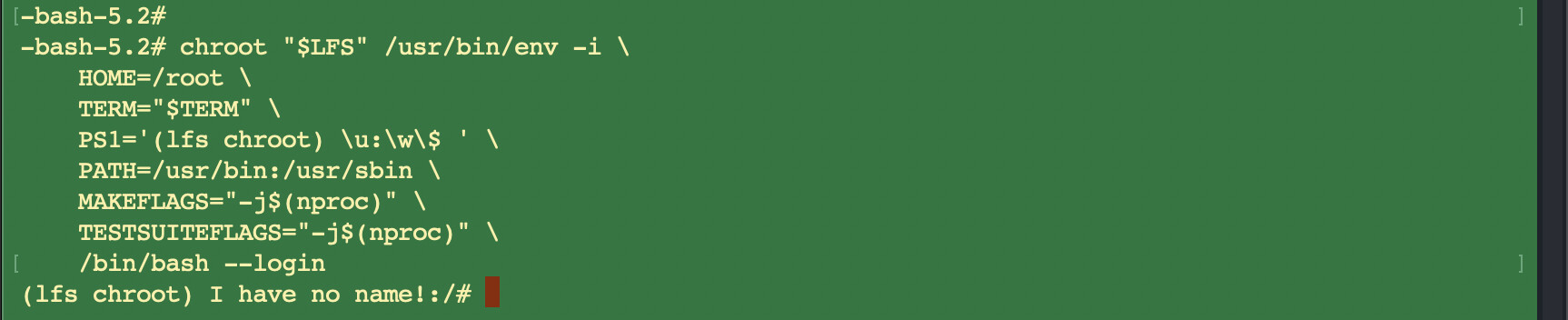
This is the threshold. The chroot command sets the root directory to $LFS, so from inside, / is the LFS filesystem. You stop being on the host and start being inside the system you are building.
chroot "$LFS" /usr/bin/env -i \
    HOME=/root \
    TERM="$TERM" \
    PS1='(lfs chroot) \u:\w\$ ' \
    PATH=/usr/bin:/usr/sbin \
    MAKEFLAGS="-j$(nproc)" \
    TESTSUITEFLAGS="-j$(nproc)" \
    /bin/bash --login
A few things that are normal and expected:
env -iclears the environment, then only HOME, TERM, PS1, PATH, MAKEFLAGS, and TESTSUITEFLAGS are set.- From here on the
$LFSvariable is not used. Everything is relative to/, which is now the LFS root. /tools/binis deliberately not in PATH, so the cross-toolchain is no longer used.- The prompt shows
I have no name!because/etc/passwddoes not exist yet. This is expected and gets fixed shortly.
7.5 Creating Directories
Inside the chroot now, so these no longer use $LFS. This builds the full FHS directory tree.
mkdir -pv /{boot,home,mnt,opt,srv}
mkdir -pv /etc/{opt,sysconfig}
mkdir -pv /lib/firmware
mkdir -pv /media/{floppy,cdrom}
mkdir -pv /usr/{,local/}{include,src}
mkdir -pv /usr/lib/locale
mkdir -pv /usr/local/{bin,lib,sbin}
mkdir -pv /usr/{,local/}share/{color,dict,doc,info,locale,man}
mkdir -pv /usr/{,local/}share/{misc,terminfo,zoneinfo}
mkdir -pv /usr/{,local/}share/man/man{1..8}
mkdir -pv /var/{cache,local,log,mail,opt,spool}
mkdir -pv /var/lib/{color,misc,locate}

ln -sfv /run /var/run
ln -sfv /run/lock /var/lock

install -dv -m 0750 /root
install -dv -m 1777 /tmp /var/tmp
/root gets mode 0750 so only root can enter it. /tmp and /var/tmp get 1777 with the sticky bit so any user can write but cannot delete others’ files.
One trap the book flags: the directory /usr/lib64 must not exist. The LFS editors deliberately do not use it, and if it gets created inadvertently it will probably break the system. Worth checking it does not exist from time to time.
7.6 Creating Essential Files and Symlinks
This creates the core system files and fixes the “I have no name!” prompt. Run each heredoc as a single block.
The mtab symlink and a basic hosts file:
ln -sv /proc/self/mounts /etc/mtab
cat > /etc/hosts << EOF
127.0.0.1 localhost $(hostname)
::1 localhost
EOF
The /etc/passwd file (note the quoted “EOF” which prevents variable expansion):
cat > /etc/passwd << "EOF"
root:x:0:0:root:/root:/bin/bash
bin:x:1:1:bin:/dev/null:/usr/bin/false
daemon:x:6:6:Daemon User:/dev/null:/usr/bin/false
messagebus:x:18:18:D-Bus Message Daemon User:/run/dbus:/usr/bin/false
systemd-journal-gateway:x:73:73:systemd Journal Gateway:/:/usr/bin/false
systemd-journal-remote:x:74:74:systemd Journal Remote:/:/usr/bin/false
systemd-journal-upload:x:75:75:systemd Journal Upload:/:/usr/bin/false
systemd-network:x:76:76:systemd Network Management:/:/usr/bin/false
systemd-resolve:x:77:77:systemd Resolver:/:/usr/bin/false
systemd-timesync:x:78:78:systemd Time Synchronization:/:/usr/bin/false
systemd-coredump:x:79:79:systemd Core Dumper:/:/usr/bin/false
uuidd:x:80:80:UUID Generation Daemon User:/dev/null:/usr/bin/false
systemd-oom:x:81:81:systemd Out Of Memory Daemon:/:/usr/bin/false
nobody:x:65534:65534:Unprivileged User:/dev/null:/usr/bin/false
EOF
The /etc/group file:
cat > /etc/group << "EOF"
root:x:0:
bin:x:1:daemon
sys:x:2:
kmem:x:3:
tape:x:4:
tty:x:5:
daemon:x:6:
floppy:x:7:
disk:x:8:
lp:x:9:
dialout:x:10:
audio:x:11:
video:x:12:
utmp:x:13:
clock:x:14:
cdrom:x:15:
adm:x:16:
messagebus:x:18:
systemd-journal:x:23:
input:x:24:
mail:x:34:
kvm:x:61:
systemd-journal-gateway:x:73:
systemd-journal-remote:x:74:
systemd-journal-upload:x:75:
systemd-network:x:76:
systemd-resolve:x:77:
systemd-timesync:x:78:
systemd-coredump:x:79:
uuidd:x:80:
systemd-oom:x:81:
wheel:x:97:
users:x:999:
nogroup:x:65534:
EOF
Add a temporary tester user needed by some Chapter 8 tests (removed at the end of that chapter):
echo "tester:x:101:101::/home/tester:/bin/bash" >> /etc/passwd
echo "tester:x:101:" >> /etc/group
install -o tester -d /home/tester
Now start a new shell so name resolution works and the prompt fixes itself:
exec /usr/bin/bash --login
The prompt changes from (lfs chroot) I have no name!:/# to (lfs chroot) root:/#.

Initialize the log files:
touch /var/log/{btmp,lastlog,faillog,wtmp}
chgrp -v utmp /var/log/lastlog
chmod -v 664 /var/log/lastlog
chmod -v 600 /var/log/btmp
The Package Builds
Six packages are built inside the chroot. Notice the configure lines no longer use --host or --build or DESTDIR. You are building natively in the system now, so installs go to /usr directly. Sources are at /sources, not $LFS/sources, since / is the LFS root.
7.7 Gettext (1.5 SBU)
Only three programs are needed from Gettext for the temporary tools, so the install just copies three binaries.
./configure --disable-shared
make
cp -v gettext-tools/src/{msgfmt,msgmerge,xgettext} /usr/bin
7.8 Bison
./configure --prefix=/usr --docdir=/usr/share/doc/bison-3.8.2
make
make install
7.9 Perl
Perl uses its own Configure script. The -des flags run it with defaults and minimal output. The version-based library paths let you upgrade patch levels later without reinstalling modules.
sh Configure -des \
    -D prefix=/usr \
    -D vendorprefix=/usr \
    -D useshrplib \
    -D privlib=/usr/lib/perl5/5.42/core_perl \
    -D archlib=/usr/lib/perl5/5.42/core_perl \
    -D sitelib=/usr/lib/perl5/5.42/site_perl \
    -D sitearch=/usr/lib/perl5/5.42/site_perl \
    -D vendorlib=/usr/lib/perl5/5.42/vendor_perl \
    -D vendorarch=/usr/lib/perl5/5.42/vendor_perl
make
make install
The “Manual page installation was disabled by Configure” message at the end is normal.
7.10 Python
The tarball starts with an uppercase P. During make you will see a message about the ssl module needing OpenSSL 1.1.1 or newer. That is expected and should be ignored. Optional modules that cannot build yet are built in Chapter 8. Just confirm the top-level make does not fail.
./configure --prefix=/usr \
            --enable-shared \
            --without-ensurepip \
            --without-static-libpython
make
make install
7.11 Texinfo
./configure --prefix=/usr
make
make install
7.12 Util-linux
Create the FHS hwclock directory first, then configure with a long list of disable flags that prevent warnings about components needing packages not yet in LFS.
mkdir -pv /var/lib/hwclock
./configure --libdir=/usr/lib \
            --runstatedir=/run \
            --disable-chfn-chsh \
            --disable-login \
            --disable-nologin \
            --disable-su \
            --disable-setpriv \
            --disable-runuser \
            --disable-pylibmount \
            --disable-static \
            --disable-liblastlog2 \
            --without-python \
            ADJTIME_PATH=/var/lib/hwclock/adjtime \
            --docdir=/usr/share/doc/util-linux-2.41.3
make
make install
A note on the configure output here: the long block of -W flags printed in the configure summary is not warnings from the build. It is the list of warning flags configure will pass to the compiler. Purely informational. The status lines above it (Btrfs support yes, Wide-char support yes, Systemd support no) are the ones that matter, and they are correct for this temporary stage.
7.13 Cleaning up and Saving the Temporary System
Cleaning (inside chroot)
Remove documentation that should not end up in the final system, remove libtool .la files, and remove the /tools directory since the cross-toolchain is no longer needed.
rm -rf /usr/share/{info,man,doc}/*
find /usr/{lib,libexec} -name \*.la -delete
rm -rf /tools
Backup: snapshot instead of tar
The book offers an optional tar backup of the temporary system. On Proxmox a VM snapshot does the same job faster, so I snapshot instead of creating the tar archive. The snapshot captures the temporary system state for rollback if Chapter 8 goes wrong.
The clean way to do this is to exit the chroot and unmount the virtual filesystems before snapshotting, so the snapshot is not taken with the kernel filesystems mounted.
exit
echo $LFS
mountpoint -q $LFS/dev/shm && umount $LFS/dev/shm
umount $LFS/dev/pts
umount $LFS/{sys,proc,run,dev}
Verify Before Snapshotting: A Caught Issue
This is worth documenting. After running the unmount block, I verified rather than assuming:
findmnt | grep /lfs
The check showed all six virtual filesystems were still mounted. The unmount commands had not taken effect, likely because the pasted block collided with the chroot exit. Had I snapshotted at that point, the snapshot would have captured mounted virtual filesystems.
The fix was to unmount them one at a time, checking each, then verify again:
umount /lfs/dev/shm
umount /lfs/dev/pts
umount /lfs/dev
umount /lfs/sys
umount /lfs/proc
umount /lfs/run
findmnt | grep /lfs
After that, findmnt showed only the /lfs root partition (the ext4 on /dev/sda4), which is correct, that stays mounted. All six virtual filesystems were cleanly unmounted.
Lesson: always verify the unmount with findmnt before snapshotting. Do not assume a pasted block of umount commands all succeeded. The cautionary check before moving on is exactly what caught this.

What Is Next
The temporary system is complete and saved. Part III of the book is done. Chapter 8 is the core system build, where the final versions of all the system packages get compiled and installed inside the chroot. That is the largest chapter in the book.
Remember the cross-session rule: before re-entering the chroot for Chapter 8, the virtual kernel filesystems must be remounted (section 7.3) and the chroot re-entered (section 7.4), since they were unmounted for the snapshot.
More updates to follow as each build phase completes.
Previous: Chapter 6: Cross Compiling Temporary Tools | Next: Chapter 8 - Installing Basic System Software (coming soon)
All session notes and build logs are committed to the private repository at github.com/QuietWireDev/fathom-os.